 +
+
Automate Your Skool Content to Social Media with n8n
Connect your SkoolFeed RSS feeds to n8n and automatically post your Skool community content to Twitter, LinkedIn, Facebook, and more. Free JSON workflow included.
What is n8n?
n8n is a powerful, open-source workflow automation tool that lets you connect different apps and services together. Think of it as a self-hosted alternative to Zapier, but with more flexibility and no per-task pricing.
With n8n, you can create automated workflows that trigger based on events - like when a new post appears in your SkoolFeed RSS feed - and then perform actions like posting to social media, sending emails, or updating a database.
Why Connect SkoolFeed with n8n?
When you combine SkoolFeed's RSS feeds with n8n's automation capabilities, you unlock powerful content distribution workflows:
Twitter/X
Auto-tweet new posts
Share to your network
Telegram
Notify your channel
Send newsletters
How to Set Up the Integration
Follow these steps to connect SkoolFeed with n8n and start automating your content distribution:
Get Your SkoolFeed RSS URL
Install the SkoolFeed Chrome extension, visit your Skool community, and copy your unique RSS feed URL from the extension popup or dashboard.
Set Up n8n
If you don't have n8n yet, you can use n8n Cloud (free tier available) or self-host it. Create an account and access your workflow editor.
Import Our Workflow Template
Download our pre-built JSON workflow below and import it into n8n using the "Import from File" option in your workflow editor.
Configure Your Credentials
Update the RSS Feed URL node with your SkoolFeed URL, then connect your social media accounts (Twitter, LinkedIn, etc.) in n8n's credentials section.
Activate and Test
Enable the workflow, trigger a manual test, and watch your Skool content automatically post to your connected platforms.
Workflow Overview
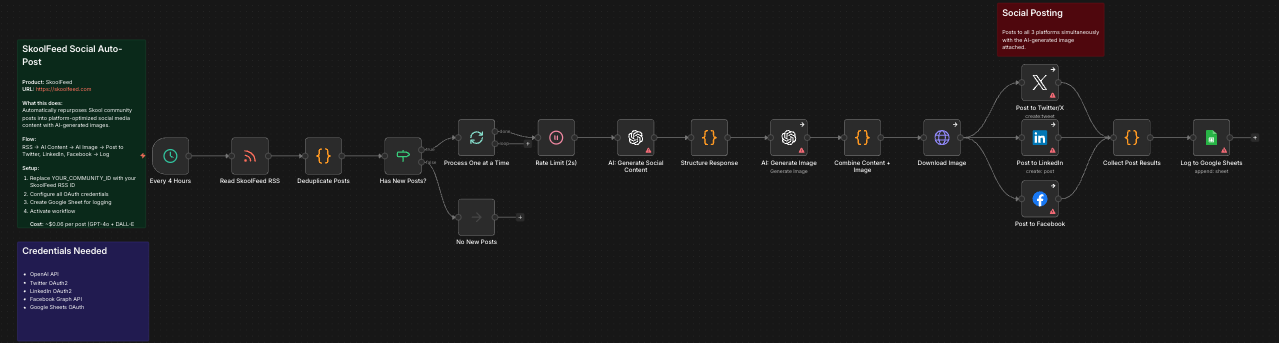
Here's what the n8n workflow looks like. It monitors your SkoolFeed RSS for new posts and automatically formats and publishes them to your social accounts.
Download the Workflow
Get our pre-built n8n workflow JSON file. Simply import it into your n8n instance and customize it for your needs.
SkoolFeed Social Media Automation Workflow
Includes: RSS trigger, content formatting, Twitter posting, LinkedIn posting, and error handling nodes.
What's Included
- RSS Feed Read Node - Monitors your SkoolFeed RSS URL for new posts
- Content Formatter - Extracts title, description, and link from RSS items
- Twitter Node - Posts formatted content to Twitter/X
- LinkedIn Node - Shares posts to your LinkedIn profile or page
- Schedule Trigger - Checks for new content every 15 minutes (customizable)
- Deduplication Logic - Prevents posting the same content twice
Customization Tips
Adjust the Posting Schedule
The default workflow checks for new posts every 15 minutes. You can modify the Cron trigger node to check more or less frequently based on your needs.
Add More Platforms
n8n supports hundreds of integrations. You can easily extend this workflow to post to Facebook, Discord, Slack, Notion, and more. Just add the appropriate nodes after the content formatter.
Customize the Message Format
The content formatter node uses a template to create your social posts. Edit the template to include hashtags, mentions, or custom formatting for each platform.
Add AI Enhancement
If you're using SkoolFeed Pro or Agency plans, your RSS feed includes AI-generated summaries. You can use these in your posts for more engaging content.
Requirements
- SkoolFeed Chrome Extension (any plan)
- n8n instance (Cloud or self-hosted)
- Social media accounts you want to post to
- API credentials for each platform (Twitter Developer account, LinkedIn app, etc.)
Ready to Automate Your Skool Content?
Get started with SkoolFeed and n8n today. Install the extension, grab your RSS feed, and start automating.